About#
A reimagination of traditional GIS paradigms#
JupyterGIS is exploring new territory at the intersection of desktop GIS and cloud-native geospatial. Our goal is to bring modern, desktop-like GIS workflows to the cloud, meeting researchers where they already work: JupyterLab.
Pre-existing desktop GIS tools like the legendary QGIS were conceived in a different era. Geospatial is a fast-moving domain and today, new opportunities exist to make GIS workflows less stressful and more joyful, and it’s our goal to take advantage of those opportunities by rethinking what GIS can be. For example, JupyterGIS is designed from the ground up with real-time collaboration and integration with Jupyter Notebooks in mind.
What JupyterGIS is not#
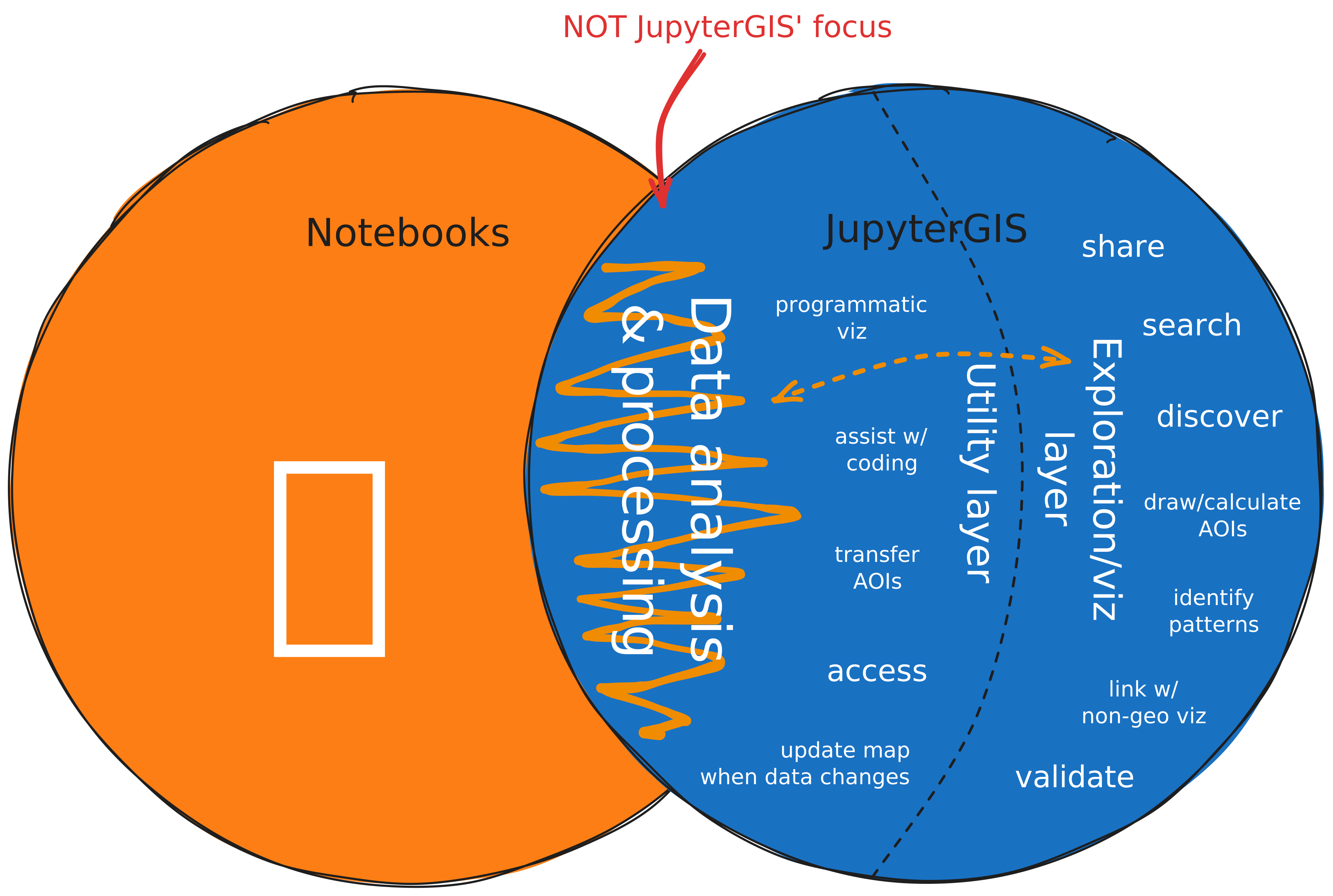
Fig. 1 A Venn diagram of our vision of JupyterGIS’ relationship to Jupyter Notebooks.#
As JupyterGIS is built for integration with Jupyter Notebooks, it’s important to consider how the traditional desktop GIS paradigm might conflict with that integration.
For example, traditional desktop GIS tools offer “processing” or “geoprocessing” tools which can be pipelined to produce unique analyses. For many practitioners that we’ve interviewed, the Jupyter Notebook ecosystem and the Scientific Python ecosystem serve that data analysis need very well. As the data analysis part of their workflow is where their expertise lies, these geospatial researchers find integration of visualization into their workflow to be a much larger challenge, and this is often a reason for them to leave their Notebook environment and open up QGIS. While QGIS serves this need very well, the friction and mental context switching introduced by working in two disjoint applications presents a definite challenge.
With these lessons in mind, the primary focus of JupyterGIS is not on reimplementing “geoprocessing” toolboxes, but on utility functionality that supports and streamlines analysis done in a Notebook environment. Where processing is needed, JupyterGIS delegates to established tools — GDAL for local operations, and cloud-native services like OpenEO and TiTiler for server-side raster processing at scale.
Architecture#
JupyterGIS is built on top of the Jupyter ecosystem. This gives it browser-based UI, kernel integration for server-side computation, real-time collaboration infrastructure, AI integration (via Jupyter AI / JupyterLite AI), and deployment options ranging from zero-install browser links (JupyterLite) to multi-user servers (JupyterHub). However, JupyterGIS can also be used independently — as a standalone web application or an embeddable map widget — without requiring a full Jupyter environment. The following sections illustrate the key architectural choices that follow from this foundation.
Browser-first#
JupyterGIS is browser-native by default, using WebAssembly to run tools like GDAL client-side, and it can be deployed as a zero-server JupyterLite site with full Python capabilities. This means anyone can open a map and start exploring without installing software or provisioning a server. Removing the server requirement drastically lowers the barrier to entry — a shared URL is all it takes to put a project in front of a collaborator, a student, or a reviewer.
Compute kernels: browser or backend#
While the UI is browser-first, JupyterGIS integrates with compute kernels that can run either in the browser (via Xeus/WebAssembly) or on a traditional Jupyter server backend. This lets users start lightweight and scale up: quick exploration happens client-side, while heavy processing can be offloaded via a server kernel with access to powerful hardware. The same Python API and notebooks work in both modes, so workflows are portable between a local laptop, a JupyterHub deployment, and a zero-install JupyterLite link.
Serializable document as source of truth#
Every JupyterGIS project is a single .jGIS JSON document that serves as the canonical source of truth.
This document is managed as a Yjs shared type (YDoc), which enables real-time collaborative editing with conflict-free resolution — multiple users can modify layers, styles, and annotations simultaneously without coordination.
Because the document is a plain JSON file, it is easy to version-control, diff, and programmatically generate or transform, making GIS projects first-class citizens in reproducible research workflows.
Decoupled renderer#
The map renderer is separated from the document schema and the user interface. Currently JupyterGIS delegates rendering to OpenLayers, but the architecture is designed to be independent of this choice — other renderers (e.g. MapLibre, Cesium) are imaginable in the future.
Flexible use within other UIs#
JupyterGIS can be embedded in different contexts: as a standalone map viewer, as in-browser GIS integrated in JupyterLab, or as an interactive widget inside a Jupyter notebook. The same project can be presented as a polished read-only map for stakeholders, an interactive workspace for analysts, or an inline visualization in a computational narrative.
Open source and modular#
JupyterGIS is open source (BSD-3) and built with a modular architecture. This design allows modification, adaptation, and integration into other systems — for example embedding a JupyterGIS map in a web application or driving it programmatically from a custom workflow.
Comparison with other GIS tools#
These architectural choices place JupyterGIS in a unique position in the GIS landscape — at the intersection of collaborative editing, computational notebooks, and cloud-native geospatial. If you believe any of these comparisons is inaccurate, please open an issue so we can correct it.
QGIS#
QGIS is the leading open-source desktop GIS — mature, feature-rich, and backed by a huge community.
As JupyterGIS, it is committed to open source and other open standards.
JupyterGIS can import and export QGIS project files (.qgs/.qgz), making it interoperable with QGIS.
QGIS is desktop-first: a powerful local IDE with efficient geoprocessing, rich cartography, print layouts, and a flexible plugin system. It excels at workflows that require deep local processing and offline work.
JupyterGIS is browser-first: no installation required, embeddable, shareable via a URL, and built with modern browser UI libraries. It can optionally decouple computation from the interface via the Jupyter protocol, making it cloud-native and ready for heavy data processing. It is highly scriptable — via Python and natural-language prompts (Jupyter AI / JupyterLite AI) — and collaborative-first via CRDTs (Yjs/YDoc).
ArcGIS#
ArcGIS (Esri) is the industry-standard commercial GIS platform — powerful, feature-complete, and mature.
ArcGIS is proprietary and closed-source with per-seat licensing and a deep ecosystem (Living Atlas, ArcGIS Online). It is the default choice for many organizations already invested in Esri infrastructure, but it cannot be inspected, modified, or independently audited, and it is governed by a single company.
JupyterGIS, in contrast, is free, open source, community-driven with multiple organizational stakeholders, and built for modification and integration. It is also browser-first, scriptable, cloud-native, and can connect to powerful backend kernels. Due to its open nature, JupyterGIS excels when you need tight integration with other systems, browser-first access, customization and sovereign infrastructure that you control.
Google Earth Engine#
Google Earth Engine (GEE) is a cloud platform for planetary-scale geospatial analysis, backed by Google’s data catalog and compute infrastructure.
GEE is proprietary, closed-source, and tightly coupled to Google’s infrastructure. It offers an unmatched data catalog but cannot be inspected or modified, is difficult to integrate with external systems, and cannot be self-hosted. It is governed by a single company.
JupyterGIS integrates with open-source tools for compute-heavy workloads: Jupyter kernels for arbitrary server-side processing, OpenEO for cloud processing, and TiTiler for dynamic raster tile serving backed by the Pangeo stack. JupyterGIS is open source, self-hostable, and built for integration — offering cloud-native processing via open standards rather than a single vendor’s infrastructure.
Felt#
Felt is a modern, collaborative web-based mapping tool focused on ease of use for non-technical users.
Felt is a proprietary SaaS with a polished, Miro-like experience for visual collaboration. It offers enterprise VPC deployment for regulated industries, but the source code is closed — it cannot be inspected, modified, or independently audited, and it is governed by a single company. Felt does not support scripting or integration with computational workflows.
JupyterGIS shares the browser-first collaborative approach but is fully open source, community-driven with multiple organizational stakeholders, self-hostable on any infrastructure, and scriptable. It adds integration with Jupyter kernels for server-side processing and deep ties to the scientific Python ecosystem.
Rendering libraries (MapLibre, OpenLayers, Leaflet, …)#
MapLibre, OpenLayers, Leaflet, and similar projects are map rendering libraries — they draw maps, not build GIS environments.
JupyterGIS is a different layer of the stack. It currently uses OpenLayers for rendering and is built on top of these libraries, not in competition with them. The rendering engine is decoupled from the schema and interface, so alternative renderers could be integrated in the future.